Key Features
-
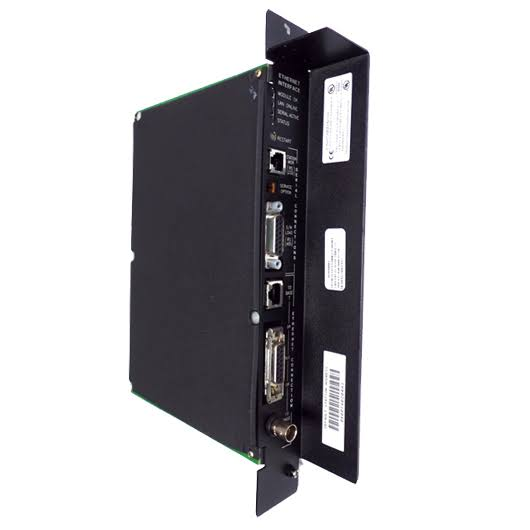
Triple Network Ports – 10BaseT (RJ-45), 10Base2 (BNC), and AUI (15-pin) ports for maximum media flexibility
-
TCP/IP via SRTP – Full PLC programming and configuration services over Ethernet
-
Ethernet Global Data (EGD) – Configuration-based and logic-based producer/consumer data exchange for deterministic peer-to-peer communication
-
32 Simultaneous Connections – High-capacity channel operation for demanding applications
-
Comprehensive Diagnostics – Four LED indicators (Module OK, LAN Online, Serial Active, Status) for station management and fault diagnosis
-
In-System Firmware Upgrade – Flash-based firmware easily updated from a PC attached to the RS-485 serial port
-
Single-Slot Installation – Fits directly in the main IC697 PLC rack
Technical Parameters
Core Advantages
1. Flexible Triple-Port Connectivity
The IC697CMM742 eliminates the need for external transceivers in most installations. The 10BaseT port connects directly to twisted-pair hubs or switches. The 10Base2 port supports direct ThinWire coax connections. The AUI port provides flexibility for 10Base5, 10BaseF, or 10Broad36 media when combined with a user-supplied 802.3 transceiver. Only one port is active at a time — the interface automatically selects the active port.
2. SRTP and EGD Protocol Support
The module provides TCP/IP communication services using SRTP for full PLC programming, configuration, and data exchange. Additionally, it supports Ethernet Global Data (EGD) — a UDP-based producer/consumer protocol designed for high-speed, deterministic data transfer between PLCs without the overhead of TCP connections.
3. High-Performance Channel Operation
With support for 32 simultaneous connections, the IC697CMM742 can handle demanding communication workloads. However, GE Fanuc documentation strongly recommends configuring read/write/transfer periods to required application rates rather than “as fast as possible” to avoid network overload and CPU resource exhaustion.
4. Comprehensive Station Management
The module includes an embedded web diagnostic page and station manager commands for real-time troubleshooting. The “killss” command terminates established SRTP server endpoints, and the “stat v” command displays received requests and client IP addresses for each endpoint. This level of diagnostic capability simplifies network troubleshooting and system optimization.
5. Proven Series 90-70 Integration
The IC697CMM742 installs in a single slot of the IC697 PLC CPU rack. Up to four LAN interfaces (total of CMM721, CMM731, CMM741, and CMM742 boards) may be installed in a single PLC. The module is not compatible with expansion racks and must be installed in the main rack.
Important Compatibility Notes
CPU Firmware Requirements
The IC697CMM742 is designed for high-performance operation with IC697 PLC CPU versions 6.00 and later. Restricted operation is supported with CPU firmware 4.12 through 5.50, but with significant limitations:
-
COMMREQ operation is not supported
-
Configuration data cannot be stored from the programming software
-
Firmware upgrades are not possible in these systems
The module cannot be used with CPU firmware versions prior to 4.12.
Power Supply Requirements
The IC697CMM742 requires a power supply that provides +12 VDC output for the AUI port. Compatible power supplies include IC697PWR711, IC697PWR721, IC697PWR724, IC697PWR731, and IC697PWR748. If an externally powered transceiver is used, +12 VDC is not required, but an erroneous “blown fuse” fault may appear in the CPU fault table.
AUI Port Precautions
Power to the PLC must be turned off whenever the AUI transceiver cable is connected or disconnected at the module or external transceiver. The SQE test must be enabled on the external transceiver, or the interface will not go online and will log a “LAN Severe Network Problem; Attempting Recovery” fault.
Installation Restrictions
The module must be installed in the main IC697 PLC rack — it will not function properly in an expansion rack. Maximum of four LAN interfaces per PLC (combined CMM721/CMM731/CMM741/CMM742 count).
Applications
The IC697CMM742 is deployed across diverse industrial control and SCADA applications:
Recommended Models & Related Products
What's Included
Note: PLC rack, power supply, transceiver (for AUI port), and programming software are sold separately.
Why Buy From Us?
-
In Stock – Ready to ship immediately
-
Fully Tested – Each module verified for functionality
-
Warranty Included – Purchase with confidence
-
Technical Support – Compatibility assistance available
Frequently Asked Questions (FAQ)
Q1: What is the GE Fanuc IC697CMM742?
It is an Ethernet Interface Module (Type 2) for the Series 90-70 PLC platform. It connects the PLC to a 10 Mbps Ethernet LAN via one of three network ports, enabling TCP/IP communications (SRTP), Ethernet Global Data (EGD) exchange, and full PLC programming services.
Q2: What network ports does the module provide?
Three ports: 10BaseT (RJ-45), 10Base2 (BNC), and AUI (15-pin). The interface automatically selects the active port — only one port can be used at a time.
Q3: What protocols does the IC697CMM742 support?
It supports SRTP (Service Request Transfer Protocol) for TCP/IP communication and Ethernet Global Data (EGD) for UDP-based producer/consumer data exchange.
Q4: How many simultaneous connections can the module handle?
The module supports 32 simultaneous connections.
Q5: What CPU firmware version is required?
Full operation requires CPU firmware version 6.00 or later. Restricted operation is supported with firmware 4.12 through 5.50, but COMMREQ is not supported, and firmware upgrades are not possible.
Q6: Can the module be installed in an expansion rack?
No. The IC697CMM742 must be installed in the main IC697 PLC rack. It will not function properly in an expansion rack.
Q7: How many LAN interfaces can be installed in one PLC?
A maximum of four LAN interfaces (total of CMM721, CMM731, CMM741, and CMM742 boards) may be installed in a single PLC.
Q8: What power supply is required?
A power supply that provides +12 VDC is required for the AUI port. Compatible models include IC697PWR711, IC697PWR721, IC697PWR724, IC697PWR731, and IC697PWR748.
Q9: What happens if I disconnect the AUI cable while power is on?
Do not connect or disconnect the AUI transceiver cable while the PLC is powered. Power must be turned off whenever the AUI cable is connected or disconnected at the module or external transceiver.
Q10: What are the LED indicators on the module?
Four LEDs: Module OK, LAN Online, Serial Active, and Status.